


AutoZonePro Mobile
4.5551.00 Reviews
App Specs
- Version
- 5.3.0
- Updated On
- License
- Free
- Downloads
- 100,000+
- Developer
- AutoZone, Inc.
- Categories
- Auto & Vehicles
- Platform
- Android
Screenshots
 Analysis by AppCompare
When I’m trying to keep a repair job moving, a parts lookup that works on a phone can save more time than it seems. AutoZonePro Mobile is aimed at professional parts ordering, so I see it as a practical companion for people who already buy parts through AutoZone, rather than a general car-maintenance app for drivers. It is free, developed by AutoZone, Inc., and sits in the Auto & Vehicles category. The average rating is 4.5 from around 1.2K ratings, with over 100K installs. Those figures suggest a useful audience, though they don’t guarantee that every shop’s ordering routine will fit the app equally well.
What to expect from the pace
I would approach it as a way to handle common ordering tasks without stepping away to a computer or making repeated calls. Looking up an item, checking availability, and keeping an eye on an order are the kinds of actions that make sense on a mobile screen. The biggest potential time saving is not a dramatic increase in raw speed; it is avoiding interruptions and unnecessary re-entry while a job is underway.
The app’s current version is 4.1.6, and it was released on Mar 30, 2018. It is rated for Everyone and requires Android 7.0 or later. Those details make it accessible to many Android users, but the age of a device and its condition can still affect how comfortable any catalog search feels. I would keep the app updated and use a reliable connection when checking stock or placing an order, especially if a customer is waiting on an answer.
Where it earns its place during a busy day
A realistic use is a technician finding that a repair needs an additional part after the vehicle is already on a lift. Rather than leaving the bay to call around, a shop user can search from the phone, check the relevant item details, and see whether ordering is worth pursuing. That helps keep the work conversation moving, but I would still verify a critical fitment before treating a catalog result as a substitute for careful vehicle identification.
One useful habit is to start with the vehicle information you trust most, then use the catalog details as a cross-check rather than relying on a single search term. A VIN scan can reduce typing and the chance of a spelling mistake, but it does not remove the need to confirm that the selected part matches the exact repair. For uncommon variants or a job with expensive consequences, taking a moment to compare the returned vehicle details with the car in front of you is sensible.
How it fits beside other ways to order
Compared with calling a parts counter, a mobile catalog can be more convenient when you know what you need and simply want to check details or progress. A call can still be better when the request is unusual, when you need a person to help reason through an ambiguous fitment, or when the app’s results do not settle the question. Compared with a desktop ordering workflow, the phone is easier to carry around the shop, while a larger screen may be more comfortable for comparing several items at once.
That distinction matters: I would not expect a phone app to replace every part of a shop’s purchasing process. It is strongest as a quick access point for AutoZonePro customers who already know the basics of the job. If your main need is broad price shopping across multiple suppliers, a single supplier’s ordering app is not the same tool as a marketplace or a phone-based conversation with several parts sources.
Worth Reading Before You Choose

EA SPORTS FC Mobile 26 Is a Bigger Football Game, but It Takes Time

Flipboard Shows What News Apps Must Do Beyond the Feed

Switching to Android Auto Means Rethinking Your Driving Routine

Google Calendar Makes a Crowded Week Easier to Manage

Ludo King Makes the Most of the Minutes Between Plans

Baby Panda World Brings Quick Play to Modern Phones, but Its Game Library Feels Busy
If you’re in the automotive repair business, you know how crucial it is to have the right tools at your fingertips. Enter AutoZonePro Mobile, the app that’s here to revolutionize your workflow. Let me take you through a breakdown of my experience with it.
Getting Started with AutoZonePro Mobile
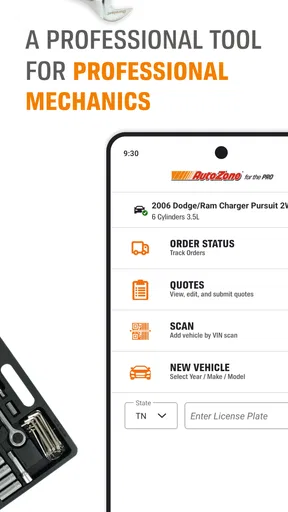
First things first, downloading the AutoZonePro Mobile app was a breeze. Available for both Android and iOS, it’s just a quick search away in the respective app stores. Once installed, I registered with my professional account, which was pretty straightforward. A couple of clicks, and I was in. The app opens up to a clean interface, which is a huge plus when you’re juggling multiple tasks in a busy garage.
Features That Make a Difference
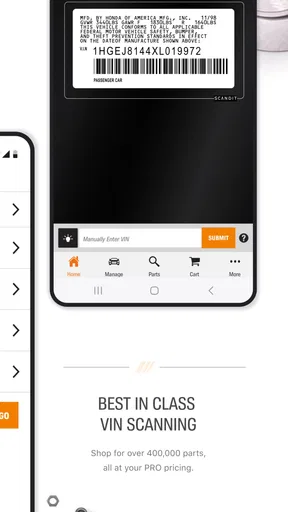
One of the standout features is the VIN scanner. I mean, who doesn’t love the idea of skipping the manual entry? Just a quick scan, and voila, all the vehicle details are right there. This feature alone is a time-saver, cutting down on errors and speeding up the process.
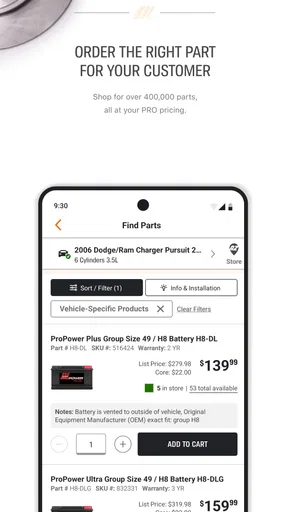
Then there’s the catalog search. Whether I’m looking for brake pads or a specific engine part, the app’s search function is like having a warehouse in my pocket. The results are detailed, with images and compatibility information, so I know I’m ordering the right part every time.
Ordering Made Easy
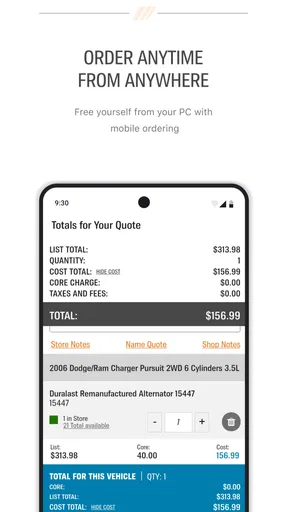
Ordering parts through the app is seamless. You can add items to your cart and keep track of your orders directly from your phone. I was initially skeptical about managing orders on a mobile device, but AutoZonePro Mobile handles it like a charm. Plus, tracking deliveries and checking order statuses couldn’t be more straightforward.
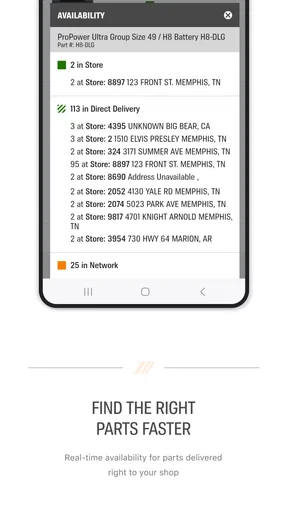
Another handy feature is the pricing and availability tool. Instead of making endless calls to check stock, I just tap a few buttons, and the info is right there. It’s perfect for those moments when a customer is waiting, and you need to give them an answer ASAP.
Support and Additional Perks
Let’s not forget about the support. AutoZone has integrated a help feature right into the app. Whether it's technical support or just some quick advice, the resources are easily accessible. This is a lifesaver during those hectic days when something goes awry.
For those of you who love staying in the loop, the app also offers industry news and updates. It’s a neat little feature that keeps you informed about the latest trends and developments in the auto repair world.
Using it when the shop is under pressure
The most demanding moments are not necessarily complicated searches; they are the interruptions that pile up. A technician may need to check a replacement while another job is waiting, and a service adviser may need a quick availability answer before calling a customer back. Keeping those checks on the phone can help, but I would avoid placing an order in a rush before reviewing the vehicle and item details. A fast workflow is useful only when it does not create a return trip or delay later.
There is also a practical trade-off between scanning and typing. Scanning can be convenient when the vehicle identification is easy to reach and readable, while manual search may be quicker if you already have the exact vehicle or part information in front of you. I would treat the scanner as an alternative input method, not a promise that every lookup becomes effortless. In a crowded or poorly lit work area, it can be sensible to fall back to a careful search rather than repeatedly trying to capture a scan.
Reliability, interruptions, and recovery
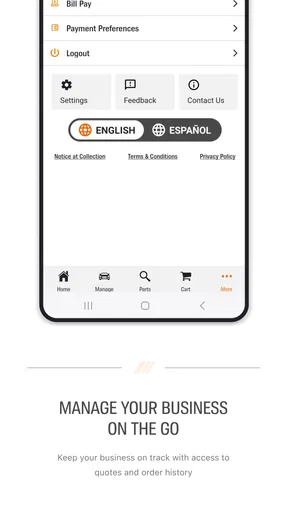
For ordering, reliability means more than whether the app opens. The useful test is whether you can get back to the right item and understand the state of an order after being interrupted by a customer, a phone call, or another task. The order-status view described in the app gives a way to check progress again from the phone, which is more reassuring than relying on memory. I would still review the cart before submitting it, particularly if several similar parts have been added during a busy stretch.
When something takes longer than expected, I would first check the connection and retry the task deliberately rather than repeatedly tapping through an order flow. That is general mobile-app common sense, not a special recovery feature I can promise here. For a time-sensitive repair, it is wise to keep the essential vehicle and part details at hand, so a call or another ordering route remains available if the phone workflow is interrupted. The built-in help option is useful to know about, but it does not turn the app into a substitute for a parts specialist when the question is technical.
Device comfort and sensible limits
The minimum Android requirement is 7.0, so someone using an older phone should check compatibility before building a routine around it. Even on a supported device, a small screen can make long descriptions or comparisons less comfortable than they would be on a computer. I would use the phone for quick identification, availability checks, and order follow-up, then move to a larger screen or a direct conversation when a job demands careful comparison across many options.
I also would not assume that a busy shop phone is always the best place to complete a complicated order. Gloved hands, a dim bay, background activity, and a low battery can all make mobile entry more awkward. Those are ordinary constraints of using a phone at work, rather than a special defect of this app. Keeping the order focused and pausing to confirm the selected item is a better approach than trying to do a complex purchasing task while moving between jobs.
Who should use it, and who may prefer another route
I can see this app suiting independent repair professionals and shop staff who regularly order through AutoZone and want access to catalog and order tasks away from a desk. It is especially useful when the person doing the lookup is also close to the vehicle, because they can compare the car with the result instead of relaying details back and forth. A newer technician may also appreciate having vehicle search and part information together, while still asking a more experienced colleague to verify uncertain fitment.
It is less compelling for a vehicle owner who only needs occasional maintenance advice, since its focus is professional parts ordering rather than a broad guide to repairs. It may also be the wrong choice for a buyer whose priority is comparing the same part across several sellers, or for a shop that needs a human conversation to resolve a tricky application before ordering. In those cases, a supplier call, a desktop catalog, or a multi-source search can be a better first step.
Final Thoughts
All in all, AutoZonePro Mobile is a game-changer for anyone in the auto repair industry. Its combination of ease of use, comprehensive features, and reliable support makes it a must-have tool for professionals. If streamlining your operations and improving efficiency sounds good to you, I’d say give it a shot. It’s like having an extra set of hands in your garage!
Whether you’re a seasoned mechanic or just starting out, this app is designed to fit right into your workflow. So go ahead, download it, and see how it can transform your daily grind. You won’t regret it!
My performance verdict
My overall impression is that the app’s value comes from keeping a parts-ordering workflow close to the repair, not from replacing every counter conversation or purchasing tool. Its strongest moments are straightforward lookups and order checks; the less certain moments are unusual fitment questions and complicated comparisons. I would keep it available on a supported work phone, use the VIN scan and catalog as aids rather than unquestioned authority, and switch to a call or larger screen when precision matters more than convenience. For an AutoZone-oriented professional, that is a useful balance. For everyone else, a different source may better match the way they buy parts.
Pros
- User-friendly interface for easy navigation.
- Comprehensive parts catalog with detailed info.
- Barcode scanning speeds up inventory checks.
- Real-time order tracking for efficient management.
- Seamless integration with AutoZonePro accounts.
Cons
- Requires stable internet for optimal use.
- Limited features for non-commercial users.
- Occasional lag on older devices.
- Some features locked behind login.
- Customer support response can be slow.
FAQs for AutoZonePro Mobile
What features does AutoZonePro Mobile offer for automotive professionals?
AutoZonePro Mobile is designed specifically for automotive professionals, providing features like quick access to repair guides, parts lookup, and inventory management. Users can also benefit from the VIN scanner to quickly identify vehicles and access detailed vehicle history and specifications. The app helps streamline workflow and improve service efficiency.
Is AutoZonePro Mobile compatible with both Android and iOS devices?
Yes, AutoZonePro Mobile is available for both Android and iOS platforms. This compatibility ensures that users can access its features regardless of their device preference. The app is optimized for a smooth experience on smartphones and tablets, allowing automotive professionals to work efficiently on the go.
How user-friendly is the AutoZonePro Mobile interface for new users?
The AutoZonePro Mobile app is designed with user-friendliness in mind, featuring an intuitive interface that is easy to navigate for both new and seasoned users. The app includes quick-access menus and a clean layout that simplifies the process of finding parts, managing orders, and accessing repair information.
Does AutoZonePro Mobile offer any customer support features?
Yes, AutoZonePro Mobile provides robust customer support features, including access to a dedicated support team for any technical issues or inquiries. The app also includes a comprehensive help section with FAQs and troubleshooting guides to assist users in resolving common problems independently.
Are there any costs associated with using AutoZonePro Mobile?
AutoZonePro Mobile is free to download, but users may need to have an established account with AutoZonePro to access certain features and services. While the app itself doesn’t charge fees, costs may be incurred based on the user’s business needs and interactions with AutoZonePro’s services.


